Show Posts

This section allows you to view all posts made by this member. Note that you can only see posts made in areas you currently have access to.


Messages - Raziel80

Pages: [1] 2 3 4 5 6
1
I am adding more info to the wiki every time I learn something new about the game, in time the info will be more and more complete if everyone does.

This is some information that is not on the Qhimm wiki: (information from here: https://sithlord48.github.io/ff7tk/FF7FieldItemList_8h_source.html)

0x0C86: Savemap address
B[1][226]: Makou Reactor variable
map: blin68_1
0x20: KeyItem: KeyCard 68

0x0C8B
B[1][231]
map: bonevil
0x08: KeyItem: Lunar Harp

0x0C8C
B[1][232]
map: sinin2_1
0x02: KeyItem: Key To Basement

0x0CBD
0x02: Mind Plus ("nivl_3") or Luck Source ("nivinn_1") (Note: they share same bit you can only get one possible)
0x04: Elixir ("niv_w")
0x08: Turbo Ether ("niv_ti1")
0x10: Platinum Fist ("niv_ti2")
0x20: Luck Source ("nvmin1_2")

0x0CEC
0x80: KeyItem: Gold Ticket ("games_1")

0x0CF1
map: games_1
0x01: Gil Plus Materia
0x02: Exp Plus Materia

0x0CF2
0x40: Sprint Shoes ("coloss")

0x0CF3
map: coloin1
0x20: Omnislash
0x40: W-Summon

0x0D44
map: min51_2
0x20: Stole boys 5 gil (note: also need to activate 0x80 bit from 0x0D65)
0x40: Turbo Ether (note: also need to activate 0x80 bit from 0x0D65)

0x0D50
0x04: HP Shout ("blin64") (If $GameMoment >= 1008)

0x0D55
map: blin63_1
0x02: Coupon A from Shinra HQ
0x04: Coupon C from Shinra HQ(0x04)
0x08: Coupon B from Shinra HQ(0x08)
0x80: Grow Lance (If MainProgress >=1008)

0x0D57
(0x01: buy "Shinra Gym Special Drink" for 250 gils)
0x02: Mind Source + Speed Source from vending machine ("blin64") (If $GameMoment >= 1008; And if "Shinra Gym Special Drink" was buyed for 250 gils)
0x10: KeyItem: Keycard 65 ("blin62_1")

0x0D60
0x02: Elemental Materia ("blin62_1")

0x0D63
0x10: MP Absorb ("yufy1")
0x80: Limited Moon ("bugin2")

0x0D65
0x08: Bahamut Zero Materia ("bugin1b")
0x10: Turbo Ether ("gidun_4")
0x80: "Found hidden draw" ("min51_2")

0x0D66
0x80: Rewarded for viewing all Turtle Paradise Flyers ("utapb")

0x0D7B
0x08: Potion ("junpb_2")

0x0D81
map: onna_52
0x01: KeyItem: Bikini briefs
0x01 and 0x02: KeyItem: Lingerie (note: two bits are activated)

0x0D82
0x10: 10 Phoenix Down ("mtcrl_8") (battle #512)

0x0D93
0x08: Work Glove ("kuro_7")
0x10: Nail Bat ("kuro_5")

    
0x0E2E wrong address in wiki, it is 0x0E31 (note: there are two 0x0E2E addresses, 2-nd is wrong)
B[11][138]
Northern Cave
0x01: Bottom of Northern Cave talk {las4_0/dic/s0}
0x02: Set to 1 when you enter the map "las3_3" comming from map "las4_1" {las3_3/dic/s0}

0x0E30 wrong address in wiki, it is 0x0E32
B[11][140]
Northern Cave - Received items from party in the last talk

0x0E38
map: games_2
0x08: Speed Source
0x20: Ink
0x40: T/S Bomb
0x80: Dragon Fang

0x0E3C (1 byte) Special Battle Wins in Battle Square
B[11][152]
If Var[11][152] == 1 then "For winning the Special Battle, Received "Final Attack" Materia!"
If Var[11][152] == 2 then "For winning the Special Battle, Received "Autograph"!"
If Var[11][152] == 10 then "For winning the Special Battle, Received "Ribbon"!"
If Var[11][152] == 3 then "For winning the Special Battle, Received "Combat Diary"!"
If Var[11][152] == 4 then "For winning the Special Battle, Received "Gambler"!"

0x0E3D
0x01: Dragon Scales ("games_2")
0x02: Cauldron ("games_2")
0x04: Chocobo Lure ("farm")

0x0EA6 (4 bytes value): AP received during current playthrough

0x0F05: Savemap address
B[13][97]: Makou Reactor variable
map: bonevil
0x01: Bahamut Zero Materia
0x02: Phoenix Materia
0x04: W-Item Materia

0x0F5C (3 bytes) (The value is updated when you enter the menu)
B[13][184]
Party leader's coordinates on world map:
Party leader X position on the world map (X coord). Value from 0 up to 295000

X Coordinates = Value & 0x7FFFF

0x0F5E (1 byte) World model Id = Value >> 3 = (0-31)

0x0F5F Party leader viewing direction

0x0F60 (3 bytes) (The value is updated when you enter the menu)
B[13][188]
Party leader Y position on the world map (Y coord). Value from 1 up to 230000

Y Coord = Value & 0x3FFFF

0x0F62 (1 byte) (Note: It looks like it is fractions for Z Coord)
Z Coord fractions = Value >> 2 = (0-63)

0x0F63 Party leader Z altitude on the world map (Z coord).

0x0F64 (8 bytes) Caught Wild Chocobo's coordinates on world map (Notes: The values are read in the same way as above. This is how Black Chocobo reads these values)
Same for Tiny Bronco/Chocobo's
Same for Buggy/Highwind's
Same for Submarine
Same for Diamond=>Ultimate=>Ruby Weapon's

0x0FA4
0x01:
0x02: Enhance Sword (gaiin_4)
0x04: Fire Armlet (gaiin_5)
0x08: Elixir (gaiin_3)
0x10: Speed Source (gaiin_3)
0x20: Javelin (gaiin_1)
0x40: Elixir (gaiin_5)
0x80: Ribbon (gaiin_1)

And here is information about 3 variables (V[3][18] = 0x0CB6; V[3][207] = 0x0D73; V[13][80] = 0x0EF4; ) that is not on the wiki:

2
Is there more detailed information about Savemap data somewhere than on the Qhimm wiki? Not all bits for field items and conversations are taken into account there.

3
Thanks for the new features.

4
Powersoul (v1.19.3) updates:
- All tabs update values automatically, except: Equipment, Stats 1, Stats 2, Stats 3, Inventory tabs. (Field Enc tab updates values only out of Battle).
- The trainer can be started before starting the emulator.
- The trainer should work with any emulator, but the name of the exe file should be: "ePSXe.exe" or "ePSXe ENG.exe" or "PCSX.exe".
- Now the trainer does not close automatically if the process is closed.

Equipment Tab:
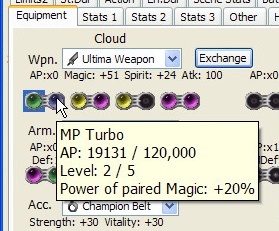
- Hint on the Materia Images shows also Materia AP levels.
- Do not need to select Materia with left mouse button first, to use a pop-up menu on the Materia Image. Only right click is needed.


Inventory Tab:
- Hint on the Materia combo box/text box shows also Materia AP levels.
Active Chars Tab:
- also displays out of Battle values for: Full Accuracy, Evade% (Def%), MDef%.
- Hint on the Critical Hit % text boxes on the right side displays out of Battle value for Critical Hit chance (Chance without Enemy Level or if Enemy Level = Actor's Level). Critical Hit % text boxes on the left side also display out of Battle value for Critical Hit chance, but only if you are out of Battle.


Field Enc tab:
- Chocobo ratings are displayed on the Chocobo tracks
- If Yuffie not in the party, then chance for Yuffie Battle is displayed in the forests.


- other minor fixes

5
White Wind (v1.20.3.1) updates:
- All tabs update values automatically, except "Equipment" tab (partially). Update button in the "Equipment" tab only updates values in the hint of the Names labels.
- The trainer can be started before starting the emulator.
- The trainer should work with any emulator, but the name of the exe file should be: "ePSXe.exe" or "ePSXe ENG.exe" or "PCSX.exe".
- Now the trainer does not close automatically if the process is closed.

Tabs: Materia 1, Materia 2, Materia Inv, Limits:
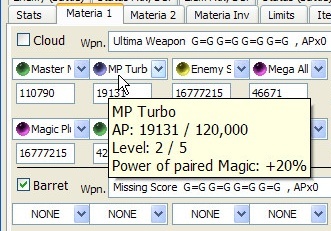
- Hint on the Materia combo boxes/text boxes shows also Materia AP levels.


Elem Atk, Def Tab:
- Elemental defense displays up to four elemental images.


Coord Tab:
- World Map image is enlarged in size and displays World map objects as labels.
- Teleport on the World map is available by click on the World map picture. To teleport check the "Enable Teleport" checkbox then click on the any place on the World map picture to teleport to this location. (make a backup copy of the Save, before doing this)
- also displays how many times the Highwind hit the Ultimate Weapon.


Chocobo Tab:
- Chocobo battles are displayed on the Chocobo tracks


- other minor fixes

6
I found a new value in the save memory. It is in the address 0x0EA6 (or where the Step counter is, minus 4 bytes). This value displays: AP received from all battles during current playthrough.

7
could opening and editing the .exe file with this program, previously modified by WhiteChocobo, cause a problem?
It should not. But, this program was tested mainly with .MNU (PSX) files. Make a backup copy of the .exe file, if something goes wrong.
There is also a third shop editor: FF7.exe Editor.

8
the list of possible values is the same as the one Akari shared.
Thanks. I want to clarify the question. What variable would you recommend using in a trainer in order to know where the player is located now: on the World map, on the Field map or in Battle? Is this map module variable most suitable for this purpose?

9
Thank you very much.

10
How to find out which map module is used during gameplay: World map or Field map or Battle? Interested in both versions PC and PSX. In theory, both versions use the same method.

11
Powersoul (v1.18.7.2) updates:
Tab "Equipment":
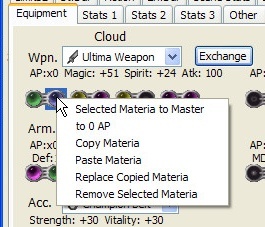
- Right click on the "Selected Materia" Image to call a pop-up menu;
Menu options: Selected Materia to Master, to 0 AP, Copy Materia,
Paste Materia, Replace Copied Materia, Remove Selected Materia.


Description:
1) Selected Materia to Master: Selected Materia, in the blue square, to Master
2) to 0 AP: Selected Materia, in the blue square, to 0 AP
3) Copy Materia: Copy selected Materia (in the blue square)
4) Paste Materia: Paste copied Materia (copies the selected Materia to other slot)
5) Replace Copied Materia: exchange Materia between two Materia slots.
6) Remove Selected Materia: Remove Selected Materia in the blue square

- Also in the "Equipment" tab, hover mouse cursor on the any Materia Image
to see hint with information about Materia.


Tab "Inventory":
- Hover mouse cursor on the Materia combo box or text box to see hint
with information about Materia

Tab "Enemy (Battle)":
- Right click on the Characters name to call a pop-up menu;
Menu options: None, Sadness, Fury, Status in Battle.
- Right click on the Characters HP Bar or MP Bar to call a pop-up menu;
Menu options: to Full, to 7777, to 50%, to 25%, to 1, to 0.

Tab "Battle Stats":
- Right click on the Characters name on the Menu Image in the Battle
to see the Status of Character.
- Right click on the Characters HP or MP value to call a pop-up menu;
Menu options: to Full, to 7777, to 50%, to 25%, to 1, to 0.
- Right click on the Characters name or "Sadness" and "Fury" words
to call a pop-up menu;
Menu options: None, Sadness, Fury, Status in Battle.
- Right click on the Limit Bar or Time Bar to call a pop-up menu;
Menu options: Full Limit Bar, Empty Limit Bar.

What is new in version 1.18.7.2: (the video is not clear, even in 1080p resolution)
https://www.youtube.com/watch?v=BJVZfThgVPo

12
White Wind (v1.19.5.3) updates:
- Tabs: "Materia 1", "Materia 2", "Materia Inv", "Limits":
Right click on the combo boxes to call a pop-up menu;
Menu options: to 0 AP, to Master.
- Also on these tabs, hover mouse cursor on the combo boxes or
text boxes to see hint with information about Materia.


- Tab "Hacks": "C.Sith reels" checkbox was added to control C.Sith reels or Tifa reels with Up, Down, Left, Right buttons, that are located near checkbox

- Tab "Enemy (Battle)": checkbox was added to display 4-th - 8-th Enemies elements in battle.
Unchecked state: elements 1-3 are displayed
Checked state: elements 4-6 are displayed
Grayed state: elements 7-8 are displayed

- Tab "Hacks 2": controls were added to change camera position in the current battle
- other minor fixes

What is new in version 1.19.5.3: (the video is not clear, even in 1080p resolution)
https://www.youtube.com/watch?v=eClO0Wvh1tU

13
Can you add two hacks to this tool?
1) run by default
2) display enemies HP in the FF7 battle help. If we change value from 0xBD to 0x00 in the address 0x004198D4 (FF7 PC 2012), then enemies HP will be displayed in the battle help.

14
Tigerlily's Shop is a Final Fantasy 7 Shop Editor.
Note: I wanted to have an improved version of the White Chocobo, that can edit PSX Pal English version of the FF7. And then I made such an editor. But later, I added support for other versions.

Should support such PC versions: PC 1998 version, Steam version 2013 (eng, de, es, fr),
PC 2012 version (eng, fr) (but the 2012 version, without Master Materia Multiplier).

Should support such PSX versions:
NTSC-U version [SCUS-94163], Pal English version [SCES-00867],
PSX Pal French, German, Spanish,
NTSC-J Japanese [SLPS-00700], NTSC-J Japanese International [SLPS-01057] versions.

Description: Editor was tested only on the PSX Pal English version. Therefore, make a backup copy of the files. (Tested on Windows XP)

The difference between White Chocobo and this editor:
- can support more than one PSX version
- has Master Materia Multiplier for PSX

Features: can edit shop data

Screenshots:
Spoiler: show


Download: Tigerlily's Shop v1.02 (32/64 bit) - Win7-10.rar - (Windows 7 Font: Segoe UI, size: 9)
                   Tigerlily's Shop v1.02 (32/64 bit) - Win XP.rar - (Windows XP Font: Tahoma, size: 8 )

The difference between WinXP Font and Win7 Font versions is in the width and height of the controls. The text in Windows 7 is slightly larger than in Windows XP, and the controls should be slightly wider.


Thanks to Corroder who helped to create this editor. Thanks to titeguy3 for making White Chocobo.

15
Does anyone have these two apps: SceneFix v1.1, BinExplorer v1.1? If you have them, please upload them somewhere.

16
Update. Version 1.19.4.6 for Windows 7 font. Link in the first post.

17
Update. Version 1.18.6.1 for Windows 7 font. Link in the first post.

18
Update.
White Wind v1.19.4.6 updates:
- Pictures were added for characters and materia.
- The width of the trainer window can be changed. If the trainer tabs do not fit in two lines, then drag the right window border to the right.
The following tab was added: Other 2.

- "Stats" tab: Limit Progress bar can change the Limit bar by click.
- Hotkey on the "Materia 1" and "Materia 2" tabs, to hide Wpn/Arm combo boxes, is changed from Ctrl + V to Ctrl + X.
- "Equipment" tab: The hint in the Names labels displays how many percent you need to add or take away from HP in order to get 77 with the last two numbers.

"Status (Battle)" tab:
- "All statuses in menu" checkbox:
If checkbox is grayed then DualDrain, D.Force, Resist, LuckyGirl and Imprisoned statuses are displayed in the battle status menu in the game.
If checkbox is checked then all statuses are displayed in the battle status menu.
(Imprisoned status is displayed as Trapped)
- "Status colors" checkbox:
If checkbox is grayed then Shield status has Peerless status color.
D.Force, Resist have Cyan color.
If checkbox is checked then Shield status has Peerless status color.
D.Force has Dark color.
Resist, Reflect have Cyan color.
Dual, Dual Drain have red (Berserk) color.

- "Other2" tab:
- Materia Equip Effect displays stats alteration for each Equip Effect value. (Can change Stats alteration)
- "Keep materia on chars in North Crater" checkbox: Keep materia on characters in the Northern Crater, when the party is divided.

19
Update.
Magic Hammer is renamed to Powersoul.
Powersoul v1.18.6.1 updates:
- Pictures were added for characters and materia.
- The width of the trainer window can be changed. If the trainer tabs do not fit in two lines, then drag the right window border to the right.

The following tabs were added: Field Items, Damage, En.Atk.
"Field Items" tab: displays all picked up Field Items.
"En.Atk" tab: displays Enemy Attacks in the current Battle (Read Only)
"Damage" tab: displays Battle damage and Attack damage

"Damage" tab checkboxes:
- "Triple linked Materia" checkbox:
If checkbox is grayed then Support Materia works for left and right side from Support Materia in game for any weapon and armor slots.
Example: O=O O, if support materia will be on the 2-nd slot, then it will work for 1-st and 3-rd materia slots.

If checkbox is checked then Support Materia works for left and right side from Support Materia in game, only for right linked weapon/armor slots.
Example: =O=O=O
To have all Right linked slots enable checkbox "Right linked slots for all".

- "Right linked slots for all" checkbox: Changes all weapon and armor slots to Right linked slots.
Warning: It can not return back all weapon/armor slots to original values. To return back all weapon/armor slots to original values, load game Save from memory card.

- "HP/MP Damage Cap Break" checkbox: Damage Cap is increased from 9999 to 32767 in the battle. (see HP/MP/Damage cap breaks screenshots)
- "HP Cap Break" checkbox: HP Cap is increased from 9999 to 32767.
- "MP Cap Break" checkbox: MP Cap is increased to 32767.
- "HP/MP Cap Break at Lvl Up" checkbox: HP/MP Cap is increased from 9999 to 32767 when you Level Up.
- "Level Cap Break at Lvl Up" checkbox: max Level is increased from 99 to 127.
- "Time Cap Break" checkbox: Time Cap is increased from 99 to 999 hours in the menu.
- "Item q-ty Cap Break"checkbox: Max Items quantity Cap is increased from 99 to 127.

"Equipment" tab: Double click on the materia picture, then double click on the other materia slot, to exchange materia between those materia slots. Or click on the Materia and press Exchange button, then click on the other Materia and press Exchange button again, to exchange those Materias.
"Scene Stat" tab: AP, Items and elements can be changed in the current battle
"Battle Setup" tab: "Cover by" labels display which enemy covers current monster. Hint displays Cover flag binary and hexadecimal values

"Limits2" tab:
"Transform: keep chars" checkbox: Keep all characters in battle, when Cait Sith uses Transform limit.

20
Github save of the wiki: https://ff7-mods.github.io/ff7-flat-wiki/
Thanks
Hi, I created the mirror just in case anything went crazy and we lost the wiki.ffrtt.ru, which would've been a catastrophe!
Thanks, for that.
All done, all changes sync'd:
FF Text format link does not work.

21
Is there no other site or server for Qhimm Wiki? My country blocks sites with ".ru". Even do not remember how many years Qhimm Wiki with ".ru" is blocked, 3, 5 or 7 years. Or maybe even 9 years. I can not get on the Qhimm Wiki site, normally.
Is there some solution to change Qhimm Wiki site address, to be without ".ru" ?

22
I made a topic about this a long time ago.
Give this a read and see if it helps.
Sorry for late reply. Tested these Attack animations for several days. (Testing was done on the PSX pal english version)
0xFE - Braver limit animation from magic menu (Cloud's limits)

0xC8 - Braver limit animation from E.Skill menu (0xFE - 0x36 = 0xC8)
0xD0 - Grenade Bomb limit animation from E.Skill menu (Barret's limits)
0xD7 - Seal Evil limit animation from E.Skill menu (Aeris limits)
0xFD - Gauntlet limit animation from E.Skill menu (Yuffie's limits)
0xFF - All Creation limit from E.Skill menu; (no animation)

0xD5 -  All Creation limit animation from manipulated enemy menu; (animation displayed)
0xDD -  Beast Flare limit animation from manipulated enemy menu; (animation displayed)

Beast Flare animation value from magic menu: 0xDD + 0x60 = 0x13D (we can use only 1 byte)
Beast Flare animation value from E.Skill menu: 0x13D -  0x36 = 0x107
Beast Flare animation value from manipulated enemy menu: 0x13D -  0x60 = 0xDD
It seems, that Summon menu can use only Summons animations.

So, the sequence of animations, on the PSX version, is as follows:
000-035: 54 Magics
036-04D: 24 E.Skills
04E-05F: 18 Summons
060-FD: 158 Enemy magic attacks (not sure about 158)
0FE-143: 70 Limits?
144-14A: 7 Toy Box animations, or 0xE4-0xEA: if used from enemy attacks
14E-15D: Enemy throws Cloud's weapons, or 0xEE-0xFD: if used from enemy attacks
0x14E (or 0xEE from enemy attack) crashes game, suppose to throw Buster Sword, but it seems that there is no throw animation for Buster Sword
0x14F or 0xEF from enemy attack: throws Mythril Saber.

I saw in the PSX code that FF7 adds 0x48 to the Attack Id if we use E.Skills. May be there is also code that adds to Animation Id.

Give this a read and see if it helps.
Thanks, it helped.

Edit: Found one way to display Beast Flare animation from magic menu.
There are current attack values in battle:
Beast Flare attack used from AI script;       Attack 1 values: 02 01 3F 14 00 41 71 00 83 00 02 00; Attack 2 values: FF 05 00 00 00 00 00 00 FF FF 03 00
Beast Flare attack used from magic menu; Attack 1 values: 02 01 3F 02 00 41 71 00 83 00 02 00; Attack 2 values: 02 01 00 00 00 2E 00 00 FF FF 03 00
(Attack 2 values used with: Satan Slam, Finishing Touch and may be with Blade Beam)
If this "02" byte is changed to 14 in a debugger while the value is set in it, then Beast Flare animation is displayed from magic menu.
In the battle, there are also values ​​in which menu the character is in. When character points on enemies with Beast Flare attack from magic menu, these values become: 02 01 71.
Where 02 - Command Id, 01 - Menu Id, 71 - Attack Id. If 02 byte changed to 14 (Limit Command Id), then Beast Flare animation is displayed from magic menu. This works for all Vincent's second limit attacks, even with Satan Slam attack, two animations are displayed properly from magic menu.

23
I want to ask two questions.
1) How to use Beast Flare animation from magic menu or limit menu?
For example: Vincent is controlled during Galian Beast transformation and Beast Flare attack is in the magic menu. But when Beast Flare attack is used, it uses Laser animation from Enemy skills. How to use the correct animation with Beast Flare attack?

2) How to use 4x-Cut command with correct animation, when Vincent is controlled in Galian Beast form?

Questions about PC and PSX versions of the game.

24
White Wind (v1.16) changes:
- Fixed error with names in the flashback
- added Tab "Materia Q-ty": Counts the amount of materia needed to create Master Magic / Summon / Command materia. Go to the Materia menu in FF7 to see the amount of current materia
- another minor fixes

White Wind (v1.17) changes:
- added Tab "Command": To change commands constantly: Select Command in the list, change this Command as you want, then select all changed Commands in the list with Ctrl button and click "Use changes" checkbox. Change commands in Battle.
- added Tab "Magic":  To change magic attacks constantly: Select Magic attack in the list, change this attack as you want, then select all changed Magic attacks in the list with Ctrl button and click "Use Magic changes" checkbox. Do the same for Summon attacks, but click "Use Summon changes" checkbox. For E.Skill attacks, click "Use E.Skill changes" checkbox. Change attacks in Battle.

25
Magic Hammer (v1.15) changes:
- Fixed error with names in the flashback
- Added in "Cheats" tab: multipliers for values in groupboxes
- Added in "Cheats 2" tab: several formulas
- Added in "Action Data" tab: several cheats
- another minor fixes

Pages: [1] 2 3 4 5 6