Show Posts

This section allows you to view all posts made by this member. Note that you can only see posts made in areas you currently have access to.


Messages - Template

Pages: [1] 2 3 4 5 6 ... 35
1
Bumped to v1.2. Should be relatively final, in a good way.

Will release on 7H catalog, but if you want to download it from my Gdrive the link is the same as on the original post: https://drive.google.com/file/d/1W4LAlsLpTAEPIjgWefkkemwyFv-oa23t/view?usp=sharing

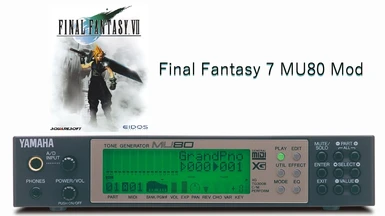
This is a soundtrack mod for Final Fantasy 7 featuring the XG MIDI data rendered through a Yamaha MU80 sound module (closest hardware equivalent of the original S-YXG70 software synthesizer).

Important notes:
-Recommend setting both music and sfx volume to 100%.
-Recommend to install this mod in raw folder structure to your 7H library rather than packing it into an iro--7H catalog will install as a folder. Slowdowns on the worldmap when running this mod in iro format were resolved by unpacking.
 
Version History:
1.2 Overhaul of original files to restore peak levels and dynamics.
   -Updated opening sequence to adjust sync, tighten the transition to the first field.
1.101 Initial 7H catalog release.
   -Normalized loudness.
   -Added new opening movie sequence. 
1.1 NidoLNorris' NexusMods release.
   -Increased bit rate.
1.0 The original 1.0 upload is lost to time.

Installation:
**Using the 7th Heaven mod catalogue to download and install is the easiest option.**
To install the mod from a folder manually, you can choose one of these methods...
1.) Use the 'Import Mod' option in the 7H UI.
2.) Drop the MU80 Soundtrack folder into your 7th Heaven mod library directory and set 7H to automatically import mods from your library in General Settings.
3.) Paste the ogg files from the MU80 Soundtrack\Music\Vgmstream folder into the data\music_ogg directory in your Final Fantasy VII installation location. The lb2 track option needs to be copied as well from either the LB2\vocals OR the novocals directories. This option bypasses 7th Heaven and would be recommended for troubleshooting.

All credit for these recordings belongs to user Raymond from the old Square Enix forums (except for the opening movie sound effects track--the opening.ogg file contained in this pack is from Deets XG Music).
 
Additional authors: Template, NidoLNorris

2
Thank you Template! Great option to have on 7H catalog.
Quick one: How do you compare this soundtrack to Deet's XG Music mod (Yamaha S-YXG50 SoftSynthesizer)? What are the main differences?
Hey thanks Kuraudo,

Generally, the MU80 mod should be "cleaner". As I understand it, the MU80 hardware synth uses 16-bit uncompressed samples and the S-YXG50 uses 8-bit compressed. It's amazing how well the software synth emulates the MU hardware synthesizers from this era, which all use the same/similar, much higher-quality, wave ROMs. People have tried to rework the S-YXG50 dlls to fit the uncompressed samples in, but I am not sure if anyone has been successful. Yamaha really went out of their way to keep the S-YXG50 in its product category.

I'd point to the differences when A/Bing ob.ogg--the S-YXG50 is essentially emulating the MU80, so, the differences are subtle, but you have this drop in tone quality, some instruments more than others. E.g., on ob.ogg there is this piercing whistle sound about 14 seconds in on the S-YXG50 version and you don't get that kind of hiss from the MU80 soundtrack, the instruments are just processed differently. The most noticeable way this comes through is the deep bass end--MU80 has more digital information in the sub bass region. A few instruments are noticeably different but most are very. very similar and most tracks would be hard to tell the difference without headphones and/or a good ear.

I've normalized the tracks slightly in the current release of MU80, but it needs another try with a softer hammer to really restore the peaks in loudness, so I'm working through all the tracks with Audacity again and making some smarter compromises.

I'm also still working on the opening and this is one area where the 2 mods differ pretty noticeably--the transition from opening_va to ob.ogg. The MU80 current release sacrifices the audio sync when the FF7 title pops up in the opening movie in order to get a very solid sync when Avalanche start exiting the train. I am trying to work out how to adjust the tempo in order to sync both sections of the opening perfectly.

P.S. One more very early example--the deep "bloop" sound effects and the reverb quality on makoro.ogg are much more pronounced and complex sounding from the MU80. Much harder to hear these effects with the S-YXG50 cut--they just don't come off nearly as ominous sounding.

3
I didn't bump the version number because it doesn't really matter, but I ninja updated the file package with newly normalized audio files, figured out how to get the new opening movie sequence process built and synced up right, and I got this sucker published on the 7H Qhimm catalog! I hope even just 1 person gets some enjoyment out of this old soundtrack version--I think the sound is pretty studio fat, lots of warmth and low-end weight, some cool sound effects in some of the tracks that I wouldn't have expected from a purely midi based setup. It's sophisticated, but as quirky and familiar as ever. 

4
Releases / Re: [FF7PC-98/Steam] Deet's XG Pack
« on: 2025-11-11 22:15:21 »
Been puzzled by a graphics slowdown issue on worldmap i've been getting recently--and I think I tracked it down to using HQ ogg music iros in 7th heaven. When I test Deet's XG Pack installed as an iro in 7H I get massive slowdown around Gongaga/Corel Desert area (just as an example). It occurs without any world map mods on even. If I unpack the Deets XG IRO and run the mod through 7th heaven in folder structure instead, slowdown is gone. Can anyone confirm? I never noticed it until I started playing FF7 in 60fps+

Edit: Looks like I'm getting drops down to 30fps with the iro file active--but with the Deet's XG mod auto imported from folder I get 90fps with 2x speed on, which I guess is about the most my system can do on the worldmap.

5
the 16/9 bug was for the full installer only not for the iro, i haven't updated minigames iro for ages, does it bug with 4/3 too ?


It does, I turned off all other mods to just test the minigame iro by itself and it stays as in the screenshot. Also, 4:3 and 16:9 driver setting, the scaling is exactly the same for the fort condor map with black bars on all sides on my 16:9 monitor.


The full Unified installer is perfect on this map, so I pulled the relevant condor files from there and repackaged the iro: https://drive.google.com/file/d/1S1VPLfLRIgPQuyP0BNkbqCSNP4F8WBeD/view?usp=sharing

6
Releases / 7H Package for Yamaha MU80 XG Soundtrack Mod
« on: 2025-10-31 19:52:35 »
Hey all, hope everyone is well.
I was playing around with soundtracks and stumbled across the Yamaha MU80 hardware render of the XG midi files and I really like them.
Since there wasn't an .iro package I could find for it, I decided to build one, you can download it from my google drive:
https://drive.google.com/file/d/1W4LAlsLpTAEPIjgWefkkemwyFv-oa23t/view?usp=sharing
--OR INSTALL VIA 7TH HEAVEN MOD MANAGER--


The original mod page is at Nexus Mods: https://www.nexusmods.com/finalfantasy7/mods/60?tab=description

Edit: After much testing, I decided it's better to install this mod with 7th Heaven without using the iro file compression, which is easy to do, you just set up everything you need to make the iro work and then you just don't compress the folder into an iro and put it in the 7th Heaven library directory raw.

Edit to bump version: Added a line to the mod xml for syncing the audio with ffnx, not sure if it's needed. I guess it's v1.101 now.

7
If you have some 16/9 bugs dans downloaded the pack before 2025-10-22, please download it again, a corrupted file was uploaded at first, sorry

Ohhh, this is maybe why I'm seeing slight artifact in Fort Condor minigame battlefield... but I did reinstall the minigame iro in 7H this evening and still seeing this for the moment:


Will play around with it some more.

Thanks so much for all you do!

8
So that's definitely abnormal. Is there some issue with the file or the server?? I simply can't downoad it. I get speeds like 55 MB/s yet nothing happens. It just keeps hanging/freezing without actually dowloading. Is this a 7th heaven mod manager issue or a mod issue?

Same. Sometimes I see an update for this mod and try to download it. Had good download speed this time tonight, but it failed and then the update disappeared from the catalog.

9
Yah, not using your launcher, using 7th Heaven. To be frank, the advice is to replace those textures in the magic textures you're using because the ones in your pack don't look right. Thanks again.

10
@Satsuki

Thank you again for all the amazing work. I've done some little bit of researches but not been terribly confident in my ability to correctly go about implementing the upscaled original limit break texture without breaking the Unified magic textures in general. I thought maybe at some point you'd consider again the option for it in a future version. I took a short video to showcase both the casting animation texture and the limit break done by Grimmy ages ago. They both look more true to the original and somehow smoother in the way the texture connects to itself when wrapped around in actual gameplay (to me anyway). But these are, so far as I have seen, the only magic textures I would want to swap in.

https://www.youtube.com/embed/qzcA5-oHO-k?si=u7ddbWN9Obkj8Iud


I do also sometimes wonder why, in some places, figures are drawn sporadically shuddering rather than persisting in position as the camera moves, especially in the gold saucer speed coaster minigame. I think this happens at the very start of the game as the train pulls in as well, the Shinra guards sort of shake until the sequence settles to a fixed angle, as if to simulate a handheld camera? Is that a bug or intentional? In the speed minigame it definitely looks like a bug. 

11
Hello. Sorry to ask, I'm new. Is this the same as the Tsunamods Unified Textures? Should I download this and not the Tsunamods? Thanks

Not the same. Yes download this instead it is unbelievably good.

12
Stunning. Being able to zoom in and out is fantastic!
Thanks to everyone

13
Hi Template, you need to first update both 7th Heaven and FFNx in General Settings. Then click on Reset Defaults in General Settings. That should be doing. Oh and of course select Widescreen 16:9 from Game Driver Settings.

Heya, thanks for reply.

Not sure what I did wrong... I don't see an option to update FFNx from General Settings in 7H.

I went to https://github.com/julianxhokaxhiu/FFNx/releases and got 1.17 for both steam and 1998 releases and tried to move the files from the steam release FFNx to my game directory. Now when I go to 7H I get an unhandled exception about a given key not being present when I go to the Game Driver menu.

Edit: Sorry all, think I just needed to download new 7th Heaven as it's been a long time and doesn't seem to be able to update to newest version. Think I'm good to go

14
Hi! This looks amazing!!

I am getting an error when launching that is no doubt related to the widescreen, mesh and reset defaults buttons you are pointing out, but I cannot figure out what I need to do. I don't have a Widescreen or Mesh folders to point to. Do I need to just manually create these empty folders in the game directory and point 7H to them?

Thanks in advance!

15
Supposedly, scaled UI mod is working now

16
Open Memoria.ini in the game directory

[Graphics]
BattleFPS = 15 original fps
BattleSwirlFrames = 115 original fps curtains

I was thinking battleswirlframes is actually the length of the animation itself. I set it to 0 and it skips the godawful swirl completely, which is awesome.

17
Are the battle animations too fast or is it just me? If so, how do I configure them in standard mode?
Obs.: I am not using accelerated mode. Normal mode is already very fast.

Thanks, this update is amazing!

Yes, the framerate for battles is adjustable. They have it set to 24 by default I believe--I changed it to 20 so it's a multiple of my monitor's refresh rate and it slows it down just a tick but looks way smoother than the standard 15fps (?) I think the vanilla game runs the battles at.

18
Wow. I downloaded a previous version of this mod and got half through the game now I have to start over again. I'm playing in 4k 120hz and most of the stutters are just gone man. It looks amazing. The wide-screen scenes are jaw dropping.. The videos are amazing. The 2x speed instead of 3. This is just awesome. Thank you so much.

19
7th Heaven / Re: super slow downloads
« on: 2020-04-15 03:34:36 »
Would guess a lot of people that arent into the remake decided to download 7th heaven and mods this past week.

20
Hello everyone. All the new completed work looks stunning. Thanks so much to Aali and Dan and Tifa and Kaldarasha and all the people who have worked so hard on all of these mods.

I think it's included in bootleg, so if you have a copy of the field textures after an installation that should be fine. I'm not sure what the tools called though. Since the errors don't seem as sensitive, and only show once per error they aren't as distracting, so it's not as big of a deal.

Concerning the Popup error messages:
Has anyone been able to find the tool from Bootleg that removes them? Sorry if this has been specifically addressed elsewhere, I've been searching for a while and this was the best I could locate. <3

21
omg omg omg

22
I think Amazon sells a lot of things international don't they?

I buy most of my hardware at Newegg or Amazon. As I understand it most everything computer related is cheaper in the US but I'm sure that's not always true. I have no idea where to get stuff sent to Greece. I'm sure you could find things on eBay but it would be expensive I bet.

I bought both of the graphics cards on Hardforum.com (they have a really well set up trading forum), the Superclock Ed. was brand new in box right after AMD put out the 290s. The other card I bought used but it showed up mint and came with both of the backplates.

I'm learning how to modify cheap old steel cases right now, so there's a lot of really rough cuts around the drive cages in that picture, I pulled a lot of that metal out with wire cutters and then repainted it... The Dremel I have is crap. I'm replacing the low profile 140mm heatsink with an NH-D14 which will probably still look really weird, but I found a good 4770k and I want to see how far I can push it. I even have a vice I pulled out of my dad's workshop to delid the thing with if I can find the balls.

23
1 of them is a 780 SC and the other is a plain 780 but the plain 780 is the better GPU strangely enough. I put a Skn3t BIOS on them and run them at pretty high OC but the stock fans are absolutely amazing.

24


Thank you AMD and BTC/LTC for making Nvidia {Lower the Price}

25
I can't say anything about Nvidia's drivers for the last couple years but I think the AMD approach is at least on paper more logical. That is, being able to launch driver versions across multiple architecture platforms because of development design that is specifically geared towards inclusive compatibility for the future. 290x pricing is great i guess compared to TITAN, but AMD consumers need Nvidia to continue giving AMD real competition and if AMD simply squeezes Nvidia out of the game with hit-or-miss products that are also so cheap as to be disposable (major exaggeration but still... 180dollar 7950s is playing rough) and the Green guys are only left with a strategy based on hardware locked products like Gsync then I think we will all lose.

Pages: [1] 2 3 4 5 6 ... 35